The Best Cheap Computer Networking for your Home and Office
- Part 2 -
Computer Networking Works
Custom Search
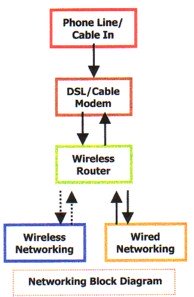
Take a look at the diagram below:
The data enters the DSL/cable modem. From there, the wireless router takes the data and splits it between the computers connected to it.
If you are using cable instead of DSL for your computer networking, you would replace the phone line with your cable connection. The cable providers may differ in areas so you will need to contact the customer service in that area for assistance.
The computers that are connected can also access data from each other providing they all have 'file sharing' enabled.
For wired networking (Ethernet), each computer needs to be fitted with a Network Interface Card (NIC).
For wireless networking, each computer needs to be fitted with a wireless network adapter.
Wireless network PCI cards installed in desktops lets you put your computer almost anywhere in the building without the cost and hassle of running network cables. Now you don't have to drill holes in your walls and climb through the attic or cellar to get connected to the network.
Once you're connected, you can keep in touch with your e-mail, access the Internet, use instant messaging to chat with friends, and share files and other resources such as printers and network storage with other computers on the network.
Computer Networking facts about the Dual-Band Wireless PCI Adapter
A Dual-Band wireless PCI adapter card allows your notebook computer to communicate with the present wireless networking standards and also prepares you for the future.
The Dual-Band PCI card connects with the 2.4 GHz, 802.11g/n wireless networks present in today's homes and businesses and with also a growing number of 5.8GHz, 802.11a networks that are now spreading across the country. The Dual-Band card supports 152-bit data encryption thus keeping your wireless computer networking communications secure.
The 802.11a standard is incredibly faster than the 802.11g and is now popular. This standard operates in the 5.8GHz band and is cleaner than the 2.4GHz band which is cluttered with other networks, Bluetooth, cordless phones, microwave and other RF interferences. Its use is increasing especially where higher speed and range are required.
Connecting two or more Computers using Network Interface Cards (NIC)
Basic networking consists of a router or switch which connects the computers on a network. Your ISP uses a Cable/DSL modem to transmit the signal through a router/access point to all the computers on your network.
Routers are either wired or wireless with built-in ethernet ports. Most routers are usually equipped with 4 ports. If more than 4 computers are to be installed in a network, a switch will have to be connected between one port of the router and the computers.
Note:If you are using dial-up and networking 2 computers, all that is required is a crossover cable provided both computers are equipped with a network card (NIC) and file sharing is enabled.
Dial up networking is more or less obsolete unless for individuals who live in extreme remote areas.
Wireless Cheap Computer Networking
If you are using a dial-up connection, wireless networking is not recommended. Wireless Networking should only be used with a high speed internet connection such as DSL and cable.
Using DSL or cable is dependent on their availability in your area.
Having Wireless Networking allows you to be able to share your internet connection with other computers without having to run network cable in your house.
It also makes moving computers around much easier. Your new laptop computer will be fitted with a built-in wireless network card. You will never have to insert a wireless network card anymore. You can use it from any room in your house. Browse here for wireless networking devices.
Unfortunately, neither DSL nor cable are available in some areas - usually remote areas. Therefore, some computer users are 'stuck' with a dial-up connection and will have to use wired computer networking.
Browse the best deals on cheap computer networking equipment here.
Enjoy this page? Please pay it forward. Here's how...
Would you prefer to share this page with others by linking to it?
Click on the HTML link code below.
Copy and paste it, adding a note of your own, into your blog, a Web page, forums, a blog comment,
your Facebook account, or anywhere that someone would find this page valuable.