Computer Memory
Installation Guide
Step 5: Install Computer Memory (RAM)
It is now time to install your RAM
Your next step will be to install your memory modules in the appropriate motherboard slots making sure that modules are compatible. Extreme care should be exercised to prevent static electricity damage to modules.
Purchase memory in dual channel DDR2, DDR3 or DDR4 kits; that is, identical pairs per kit.
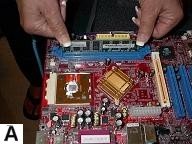
Prepare memory slots by opening the clips. Carefully hold modules and ensure proper alignment. Firmly press modules into slots until clips are completely closed and ensure that they are properly installed. (See Diagram A below).
Memory modules come in different types such as 168-pin PC100 and PC133 SDRAM used in old computers. These have now become obsolete and have been replaced by 184-pin DDR, 240-pin DDR2 and DDR3 SDRAM and lastly 288-pin DDR4 SDRAM modules which have faster access times and greater bandwidth. These memory modules are not backward compatible or interchangeable. DDR4 provides the greatest bandwidth and has decreased voltage requirements.
DDR 5 memory modules are expected for production by year 2019.
Click here to get a good deal on computer memory.
Click here for Computer Memory guide - Part 1 and Click here for
Part 2.
Browse Here for all the steps in the
Build Your Own Cheap Computer tutorial
Click Here to go to Step 6: Install Computer Internal Drives
(Hard Drive, Floppy Drive and DVD Rom Drive
Back / Next
Return from Install Cheap Computer Memory to
Cheap Computer Homepage
Enjoy this page? Please pay it forward. Here's how...
Would you prefer to share this page with others by linking to it?
- Click on the HTML link code below.
- Copy and paste it, adding a note of your own, into your blog, a Web page, forums, a blog comment,
your Facebook account, or anywhere that someone would find this page valuable.
|