Guide to Cheap Computer
Sound Card Installation
Step 11: Install Computer Sound Card
A computer sound card or audio card can be built into the motherboard but, again, I am referring to the discrete type which is a computer expansion card and is usually installed in a PCI or PCI-Express slot.
USB types were made to alleviate the problem of having to re-open your computer to install the PCI Express type. These were quite convenient and performed ably. Click here to view PCI-E and USB sound cards.
You can never be too careful when installing these sensitive electronic components. Exercise caution by wearing an anti-static wrist strap to prevent static electricity damage.
You can learn more about Static Electricity here and click here for an anti-static wrist strap.

NOTE: NEVER use a magnetized screwdriver during installation.
Remove the expansion slot cover from the computer case. (See Diagram A below).
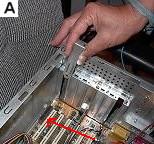
Expansion Slot Cover Removal
On most motherboards, the PCI and PCI-Express slots are usually white and black in color with the latter being black and approximately an inch in length.
Due to the heat generated by the video card, place the sound card in a PCI slot away from the video card if possible.
The card and the slot are keyed so it is almost impossible to insert the card incorrectly.
Install the card in the PCI slot. Press down firmly and evenly across the top of the card until it is securely seated in the PCI slot taking care not to damage the card or the slot. (See Diagram B below).
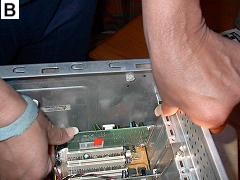
Sound Card Insertion
Secure the sound card to the computer case using a small screw. (See Diagram C below).
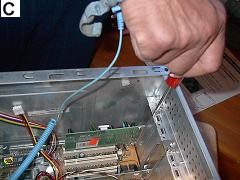
Secure Sound Card to Computer Case
Click Here to go to Step 12: Connect Computer
Peripheral to Back Panel
Back / Next
Click here to read: "What are Computer Sound Cards?".
Click here for a great price on a cheap computer sound.
 Browse here for all the steps in the
Build Your Own Cheap Computer tutorial
Return from Computer Sound Card to
Cheap Computer Home Page
Enjoy this page? Please pay it forward. Here's how...
Would you prefer to share this page with others by linking to it?
- Click on the HTML link code below.
- Copy and paste it, adding a note of your own, into your blog, a Web page, forums, a blog comment,
your Facebook account, or anywhere that someone would find this page valuable.