Guide to Connecting Computer Power Supply to Motherboard
Step 9: Connect ATX 24/20-Pin Computer Power Supply Cable to Motherboard
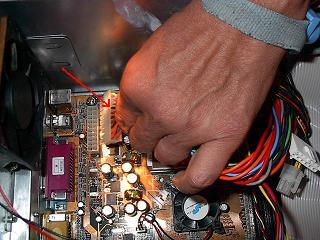
Align the clip of the ATX 24/20-pin connector with the notch in the plug and safely and firmly clip it in place. The motherboard recommended in this tutorial is an Athlon motherboard and uses the 20-pin connector.
The Pentium 4 computer motherboard uses an extra small 4-pin 12V connector for extra power needed by the CPU. It will, therefore, be necessary to also attach that connector if you are building a Pentium 4 system.
Click here to read "What is a Computer Motherboard?".
Note: An incorrectly installed plug will 'burn' your computer. (See Diagram Below).

Installation of ATX 20-Pin Connector
Click Here go to to Step 10: Install Computer Video Card
Back / Next
Click here to read: "Computer Power Supply and how it works!".
Click here for a power supply at a great price!
Browse here for all the steps in the Build Your Own Cheap Computer tutorial
Return from Computer Power Supply to Cheap Computer Home Page

|