|
|
Step 7: Computer Motherboard Installation
Computer motherboards are sometimes referred to a 'Mainboards', 'System Boards' or 'Logic Boards' (MAC).
Static electricity will 'zap' your sensitive mainboard components. Therefore, put on your anti-static wrist strap before holding your mainboard. Also, touch some metallic surface to discharge static electricity.
You can learn more about Static Electricity here.
Firstly, in mounting the system board, match the mounting holes in the system board with the holes in the computer case.
The brass or aluminium standoffs that came with your case mounting hardware should be installed in the case to support the mainboard at the appropriate locations.
The installed standoffs should be properly tightened but not over-tightened. (See Diagram A below for anti-static wrist strap).
Note: Sometimes it's more convenient to install the processor (CPU) and heat sink assembly on the mainboard before installing it due to space restrictions.
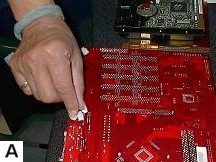
Observe the anti-static wrist strap being worn!
Install mainboard with screws supplied. After installation, check to ensure that the mainboard is not touching the case and that there are no metal standoffs or screws left on the mainboard or anywhere that could cause a short circuit on power-up. (See Diagram B below).
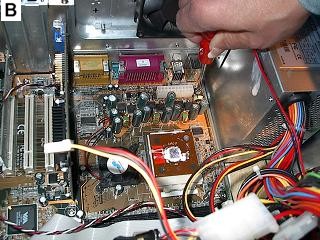
Installing motherboard
Switches LEDs/Speaker/USB Connectors
Browse Here for all the steps in the
Build Your Own Cheap Computer tutorial.
Cheap Computer Home Page

Our Disclosure and Advertising Policy. Click here to read...
* As an Amazon Affiliate I earn from qualifying purchases.
* Amazon and the Amazon logo are trademarks of Amazon.com, Inc. or its affiliates.
Why not work where your heart is?