About a Cheap Computer Case
What is its function?
Your cheap computer case (also called the chassis) is the 'slave' of your computer system.
It just does its job day after day without requiring any attention or maintenance. Click here to view some cases.
It protects the inner components of the system, keeps them cool and prevents them from causing radio frequency interference (RFI). These are important functions that are oftentimes overlooked.
Construction of the computer case is usually steel (SECC - Steel Electrically Chromate Coated) Aluminum and Plastic.
Steel makes the unit more rigid whilst aluminum is a good dissipator of heat.
Other materials are sometimes used in fabricating your cheap computer case.
Here are the basic components of the system case:
- The Power Switch - This turns the unit on and off.
- Reset Button - This performs a hardware reset similar to turning off and turning on the computer with the power switch.
- Hard Disk Activity Light - This shows when the hard disk is active.
- Drive Bays - These are the available spaces for hard drives and optical drives.
- Case Fan Mounts - Enable the installation of case fans.
- Intake Filters - Limits the amount of dust that enters the PC. These filters can be removed, cleaned and replaced.
- Power Supply Compartment - This is where the power supply unit is installed using 4 screws.
The present computer case designs provide maximum cooling using either air or liquid. One new feature is the location of the power supply unit in a special compartment at the lower rear end.
Intake vents and fans are strategically placed to provide maximum air circulation.
The flow of air in and out of the system should not be restricted. (See diagram below):
.jpg)
Typical Air flow through a Desktop Computer
There are two basic designs of computer cases - The Desktop Case and the Tower Case. (See picture below):
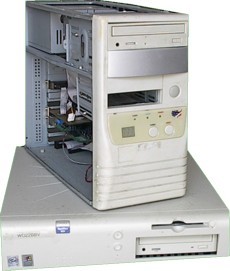
A Tower Case sitting on top of a Desktop Case ..... A touch of the old!
Within these two basic designs are different sizes known as
form factors. The size and shape of the computer case are usually determined by the form factor of the motherboard. Form factor is a measurement of the internal dimensions of the case.
The popular form factors are ATX, microATX and mini-ITX.
Among the form factors are the desktop and tower cases.
- The Desktop Case - This case is designed to rest horizontally on a desk.
- The Tower Case - This case is designed to stand vertically on the floor or desktop. It also has more space for internal disk drives and other devices that enhance the capabilities of the computer.
The tower computer case is more popular than the desktop design and is used by the majority of computer manufacturers and DIYers.
Radio Frequency Interference (RFI)
While the computer is turned on, the internal components generate stray electromagnetic radiation. This radiation is emitted at various frequencies including the ones used by radio stations. This is called radio frequency interference (RFI).
This radiation can interfere with radios and other electronic devices; therefore, it was regulated by the Federal Communication Commission (FCC).
A manufacturer must show that a computer produces an acceptable level of RFI before it can be sold. This radiation can be controlled in many ways; the most obvious being the construction of the cheap computer case.
A well-designed metal computer case controls most of this radiation and enables the manufacturer to obtain certification for the computer system. There are two levels of certification:
- FCC Class A - This class relates to business equipment.
- FCC Class B - This class relates to home equipment such as computers. Class B certification is more difficult to obtain because the potential for RFI is greater in residential areas than in commercial areas.
RFI can radiate from a computer that has a poorly designed case or from one that has opened slots - slot covers not replaced. Always replace slot covers.
Maintaining your Cheap Computer Case
Hardly anything goes wrong with the case. If it's kept clean and not abused, it will outlast every other component! If you bounce it or drop it, the delicate components inside will be damaged - so treat it gently.
Ways to prevent damage to Computer
- Allow adequate ventilation for the unit by allowing a free flow of air in and out of the unit.
- Place your cheap computer case on a stable surface where it's not likely to be bounced or pushed off.
- Install tower units where they are accessible but won't be damaged by kicks or spills. If the system is placed under a desk, ensure that it will not be damaged by anyone moving a chair in or out.
- Disk drives are delicate and can be easily damaged if the computer case is bumped while the unit is in operation.
Finally, if adapter cards are removed, ensure that the slot covers are replaced since open slots can affect air circulation through the computer causing components to overheat.
Conclusion
At first glance, the computer case doesn't seem to perform any function. But, its role is indeed an extremely important one!
Make yours the 'talk of the town' with RGB lighting.
Click here to read 'Guide to Selecting a Cheap Computer Case'.
View the step in the 'Preparation of the Computer Case' in my Build Your Own Cheap Computer tutorial here.
If you would like to learn to Build Your Own Cheap Computer,
browse here for a free step-by-step tutorial
Return from a Cheap Computer Case and its functions to
Cheap Computer Homepage
Enjoy this page? Please pay it forward. Here's how...
Would you prefer to share this page with others by linking to it?
- Click on the HTML link code below.
- Copy and paste it, adding a note of your own, into your blog, a Web page, forums, a blog comment,
your Facebook account, or anywhere that someone would find this page valuable.


